FigBuild 2026
App to Track the 6th Sense
AR Glasses for Maya, Learning to Write with Dyspraxia
Turn up the volume to listen to audio commands.
Project at a glance
The Challenge
FigBuild Hackathon 2026: Design a tool that tracks, measures, and visualizes a human sensory experience, with the ability to detect, enhance, or manipulate those same sensory inputs.
Deliverable
Speculative design concept with Figma Make prototypes
Duration
3 Days
Team
2-Person Team (MS HCI, Indiana University)
My Approach & Domain
Assistive Technology, AR + Wearables, Rehabilitation, Motor Learning
My Responsibility
UX Research, Information Architecture, Prototyping, Visual Design
Tools Used
Figma Make, Figma Slides, ChatGPT, Gemini, Claude, Canva, Google Workspace
Overview
What is 6th?
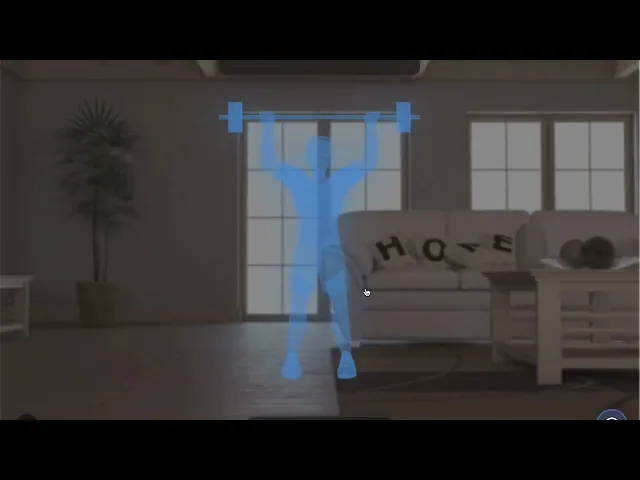
6th is a speculative AR and wearable feedback system designed to make the invisible mechanics of movement visible. Built around the concept of Kinetic Awareness, a new layer of sensory perception, 6th translates subtle body signals into real-time visual, haptic, and audio guidance overlaid directly into a user's field of view.
In everyday life, proprioception, the body's internal sense of position, force, and motion, operates unconsciously. When it's impaired or underdeveloped, even basic tasks become uncertain and frustrating. 6th addresses this gap by creating an external feedback channel that makes movement legible.
Movement is something most people take for granted, until it becomes difficult. I asked: what if I could make the invisible mechanics of movement visible?
The Hackathon Challenge
The FigBuild 2026 hackathon challenged students to design a speculative tool that tracks, measures, and visualizes an aspect of human sensory experience, and also provides the ability to detect, enhance, or manipulate those same sensory inputs. The brief emphasized novelty, human need, and future-forward thinking.
I identified proprioception, widely considered the "sixth sense", as a rich, underexplored domain. Despite its critical role in coordination, motor learning, and injury prevention, it remains largely invisible and unmeasurable to the people who rely on it most.
Problem Definition
The Invisible Sense
Proprioception is the human body's ability to sense its own position, movement, and force in space. It underlies every physical action, from gripping a pencil to catching your balance mid-stride. Unlike vision or hearing, it operates below conscious awareness: most people cannot directly observe how much force they're applying, whether their posture is misaligned, or whether their movement trajectory is off.
When proprioception is impaired, due to neurological conditions, developmental differences, injury, or stroke, this unconscious regulation breaks down. Tasks that healthy individuals perform automatically become effortful, uncertain, and often demoralizing.
Who Struggles Most
Through research and persona development, I identified two distinct user groups most affected by proprioceptive challenges:
Primary Users: Impaired Proprioception
Children with dyspraxia or developmental coordination disorder (DCD), who struggle with handwriting, drawing, and fine motor tasks
Stroke survivors relearning arm and hand movements in rehabilitation
Individuals with Parkinson's disease or tremor disorders affecting movement control
Secondary Users: Skill Learners
Athletes learning precision-based physical techniques (skating, gymnastics, martial arts)
Artists, designers, and craftspeople developing fine motor control
Drivers learning smoother vehicle control
Across both groups, the core problem is the same: users cannot perceive the movement data they need to correct, improve, or learn, and existing tools provide no real-time feedback channel to fill that gap.
Maya’s Journey: Understanding the Pain
To ground the problem definition in lived experience, I mapped the journey of Maya Patel, a 9-year-old with dyspraxia trying to complete a handwriting exercise in class. Her journey illustrates how a single common task cascades into a series of emotional and functional failures without proper feedback.
The emotional arc, starting with hope and descending into anxiety and low confidence, reinforced my conviction that this problem deserved a humane, empowering design response.
Problem Statement
As a person with impaired motor coordination, when I try to interact with everyday objects, I want to receive clear, intuitive sensory feedback so I can perform tasks accurately and confidently, but I often struggle due to inconsistent or missing cues, which makes tasks frustrating and error-prone.
The Solution: Kinetic Awareness
Introducing a New Sense
6th introduces Kinetic Awareness, an externally delivered sense that makes the physics of human movement perceptible in real time. Rather than replacing proprioception, 6th augments it: creating a parallel feedback channel through AR visuals, haptic vibrations, and minimal audio cues that tell the body what it cannot feel on its own.
Through 6th, users can perceive, for the first time:
The exact force or pressure they are applying to an object
Whether their posture and limb alignment are correct
Whether their movement trajectory matches the ideal path
When their timing is slightly off during a learned motion
System Architecture
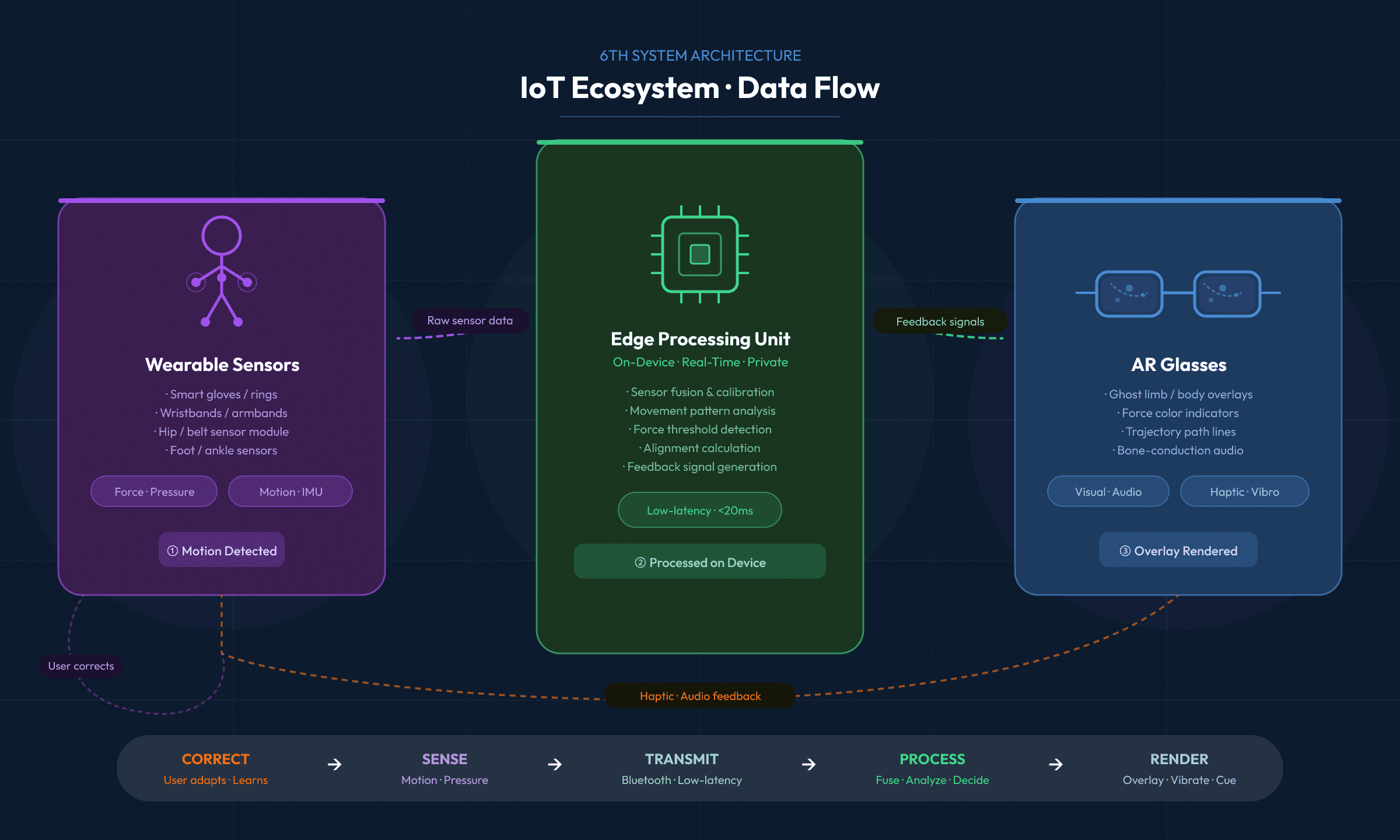
6th is built around two primary hardware components working in concert:
AR Glasses (Primary Interface)
Transparent, lightweight frame with embedded depth and RGB cameras
IMU sensors (accelerometer + gyroscope) for real-time head orientation
Bone-conduction audio for guidance cues that don't block ambient sound
Bluetooth/Wi-Fi connectivity to wearable sensors
Wearable Sensors (Body Tracking + Haptics)
Smart gloves or rings: force sensors on fingertips + vibration motors
Wristbands/Armbands: IMU-based limb orientation detection + haptic actuators
Belt/Hip-Worn Module: torso orientation, weight distribution, balance cues
Foot/Ankle Sensors: pressure mapping for gait and step guidance
Edge Processing
All sensor data is processed locally on-device via an embedded edge computing unit. This ensures real-time feedback with minimal latency, critical for movement guidance, while keeping biometric data private and off the cloud by default.
Feedback Modalities
As a person with impaired motor coordination, when I try to interact with everyday objects, I want to receive clear, intuitive sensory feedback so I can perform tasks accurately and confidently, but I often struggle due to inconsistent or missing cues, which makes tasks frustrating and error-prone.
Modality
What It Does
AR Visual Overlays
Ghost limbs and ghost body guides demonstrate correct movement. Trajectory lines show ideal paths. Color-coded indicators signal force levels (green = correct, red = too much). Cues appear only during active tasks.
Haptic Feedback
Wearable rings, gloves, and bands deliver targeted vibration pulses for excessive force, alignment corrections, and balance alerts. Allows correction without requiring visual attention.
Audio Guidance
Calm, minimal voice cues like 'Reduce pressure' or 'Follow trajectory' via bone-conduction audio. Limited to essential guidance to prevent audio fatigue.
User Modes
Rather than delivering a fixed intensity of feedback, 6th adapts to the user's stage of learning through three configurable modes:
Learning Mode
Assist Mode
Skill Mode
Full guidance for beginners. All overlays active: ghost guides, trajectory lines, force indicators, and audio cues.
Minimal corrections during known tasks. Guidance fades unless movement deviates from ideal.
Advanced training with subtle timing and balance cues. Designed for athletes and precision learners.
Use Cases
Three Stories, One System
6th was designed for specificity, not a generic fitness tracker, but a contextual movement coach that adapts to the unique needs of each user. The following use cases demonstrate the system's range across rehabilitation, education, and athletic training.
USE CASE 1
Maya: Learning to Write with Dyspraxia
Maya Patel | Age 9 | Chicago, IL | Elementary student with dyspraxia
Maya loves storytelling but struggles with handwriting. She cannot easily sense how much pressure she applies to the pencil, making her letters inconsistent and her experience in class frustrating.
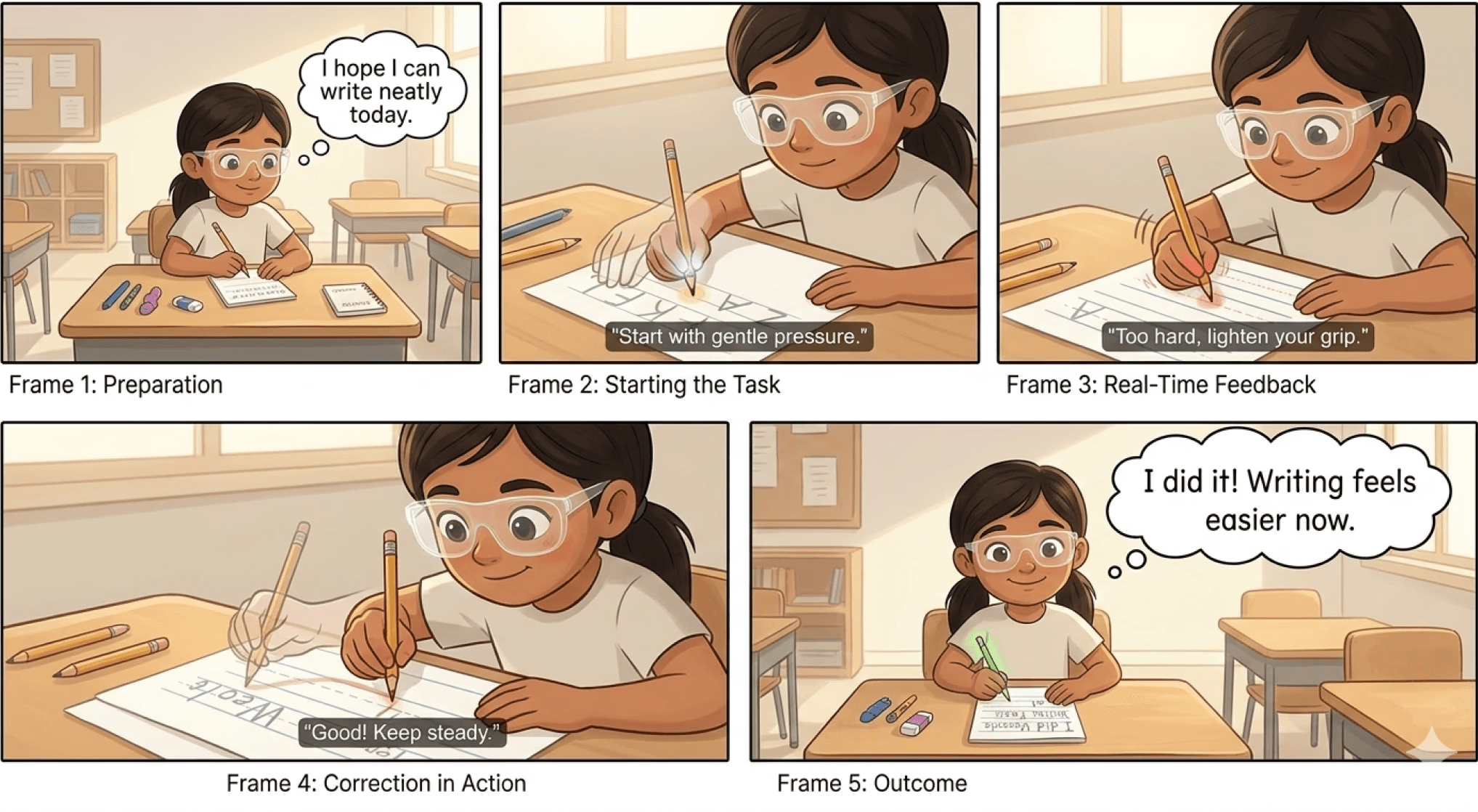
With 6th
AR glasses display a ghost hand tracing correct letter strokes above her real hand
A color indicator on the pencil tip shows real-time pressure levels (green to red)
Gentle finger vibration alerts her when pressure becomes excessive
Outcome: Maya gradually develops correct muscle memory. Writing becomes less stressful, and she gains confidence to participate more fully in class.
USE CASE 2
Daniel: Stroke Rehabilitation at Home
Daniel Rivera | Age 56 | Austin, TX | Stroke survivor in rehabilitation
Daniel's stroke affected coordination in his right arm. He attends therapy multiple times a week but struggles to practice exercises accurately at home, where no therapist can correct his form in real time.
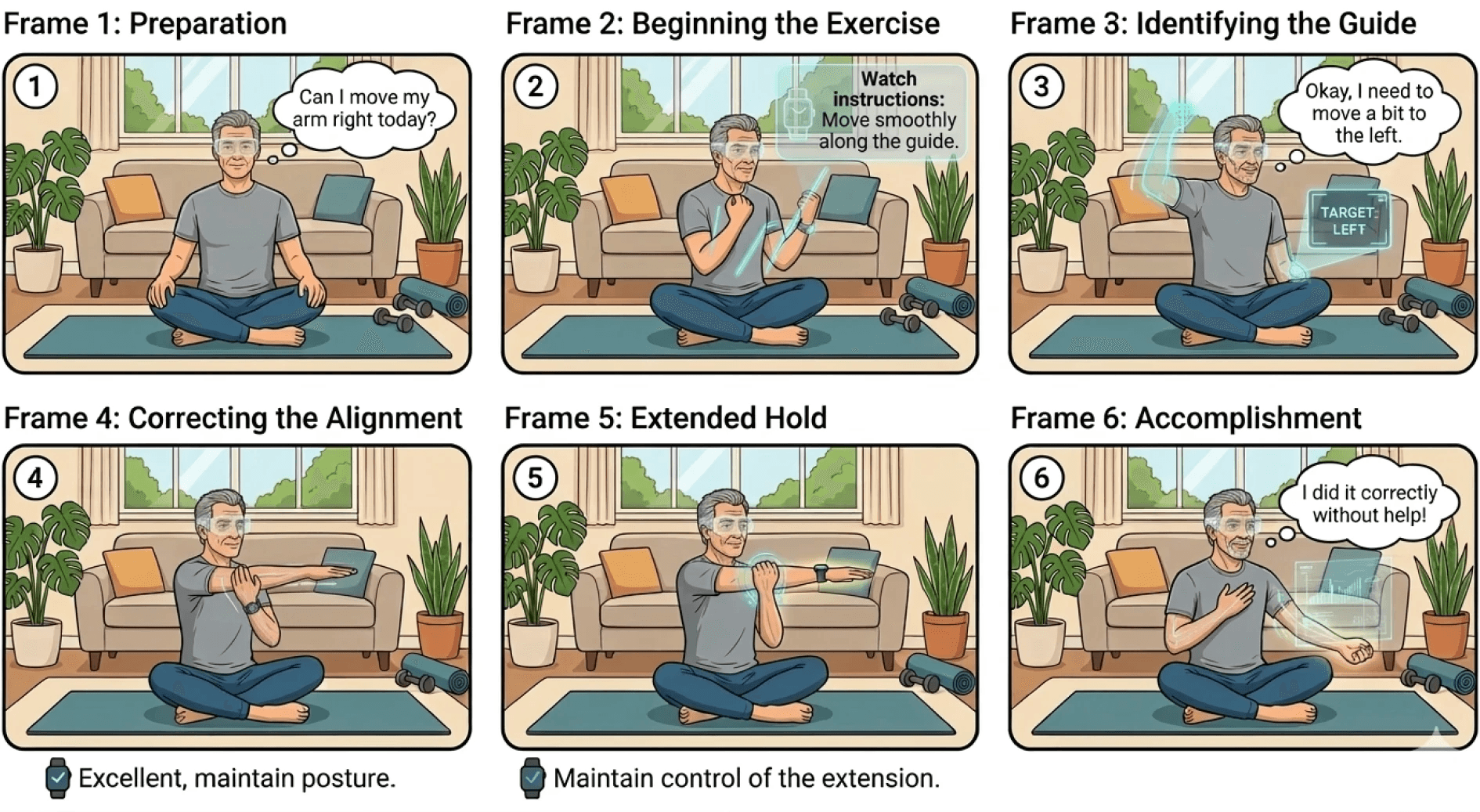
With 6th
A ghost arm overlays his real arm, showing the correct motion path for each exercise in soft blue
Alignment markers show shoulder and elbow positioning relative to ideal form
Haptic cues on his wrist signal when his arm drifts from the correct trajectory
Outcome: Daniel practices exercises with the accuracy of a supervised session. Independent practice accelerates his recovery and rebuilds his confidence in daily tasks.
USE CASE 3
Leo: Learning Ice Skating
Leo Chen | Age 19 | Vancouver, Canada | College student and skating enthusiast
Leo recently joined a university skating club. He can follow tutorials visually but struggles to translate what he sees into correct body movements, especially posture, weight distribution, and timing.
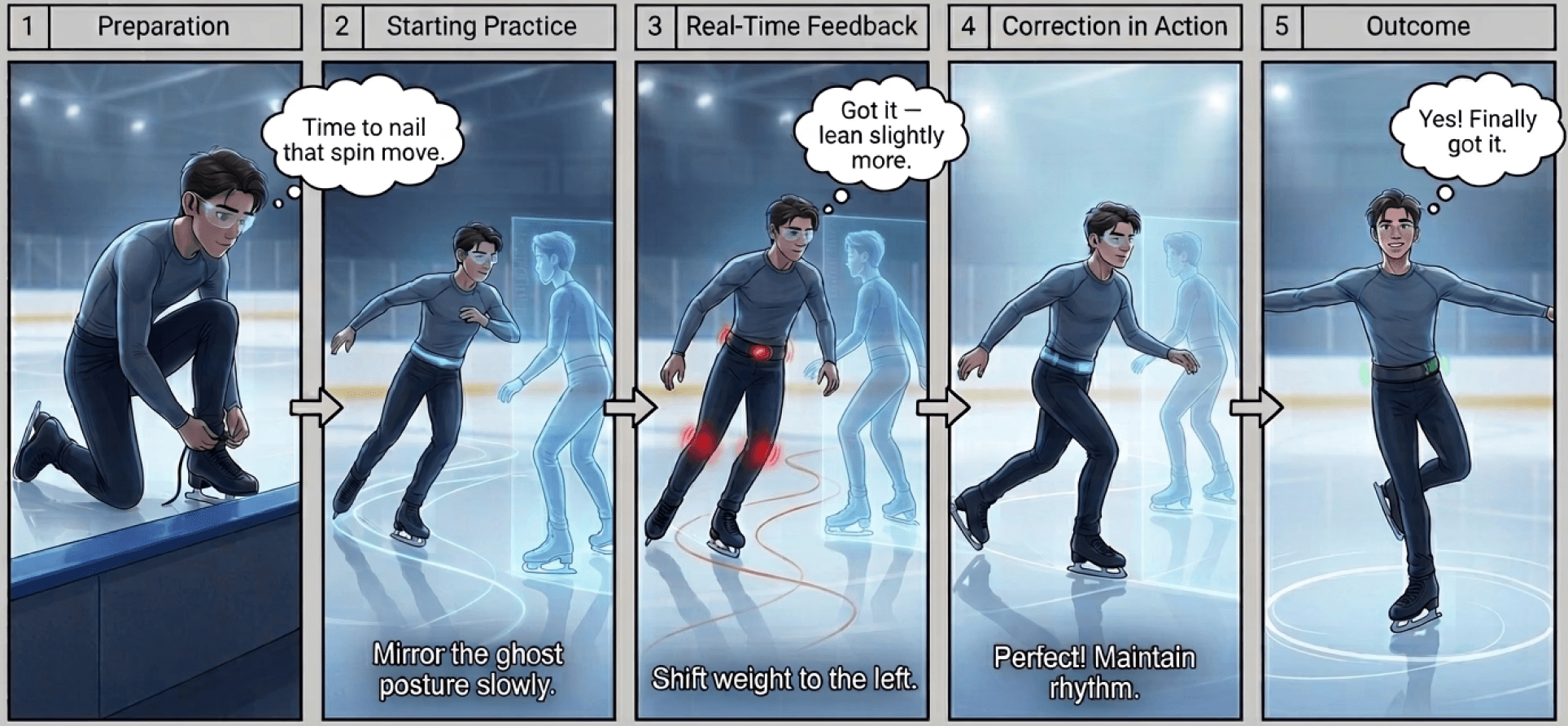
With 6th
A full ghost skater is projected onto the ice demonstrating posture, arm placement, and step sequences
Balance alignment markers appear at knees and torso when weight shifts incorrectly
Haptic belt cues prompt balance corrections as he attempts complex turns and spins
Outcome: Leo learns techniques significantly faster and develops stronger proprioceptive awareness over time, reducing reliance on the system.
Design Process
From Wild Ideas to Grounded Prototype
My design process at the hackathon was deliberately non-linear. I began with unconstrained ideation, allowing me to imagine capabilities that don't yet exist, before applying UX principles to scope a feasible, testable prototype.
Stage 1: Problem Framing
I started by asking: what human senses are underexplored, invisible, or unmeasurable? After exploring several directions, proprioception emerged as the most compelling candidate, a sense that everyone has, many people lose, and almost no existing product attempts to augment directly.
Stage 2: Persona Development
I created three personas, Maya, Daniel, and Leo, representing distinct impairment levels and use contexts. Rather than starting from technology, I started from lived experience: what does it feel like to not trust your own body? What does failure look like in a classroom, a living room, or on an ice rink?
Stage 3: Journey Mapping
Maya's journey map became the emotional anchor of the project. By mapping her exact thoughts, emotions, and pain points across a single handwriting session, I identified six concrete intervention opportunities that directly informed the feature set.
Stage 4: Prototyping in Figma Make
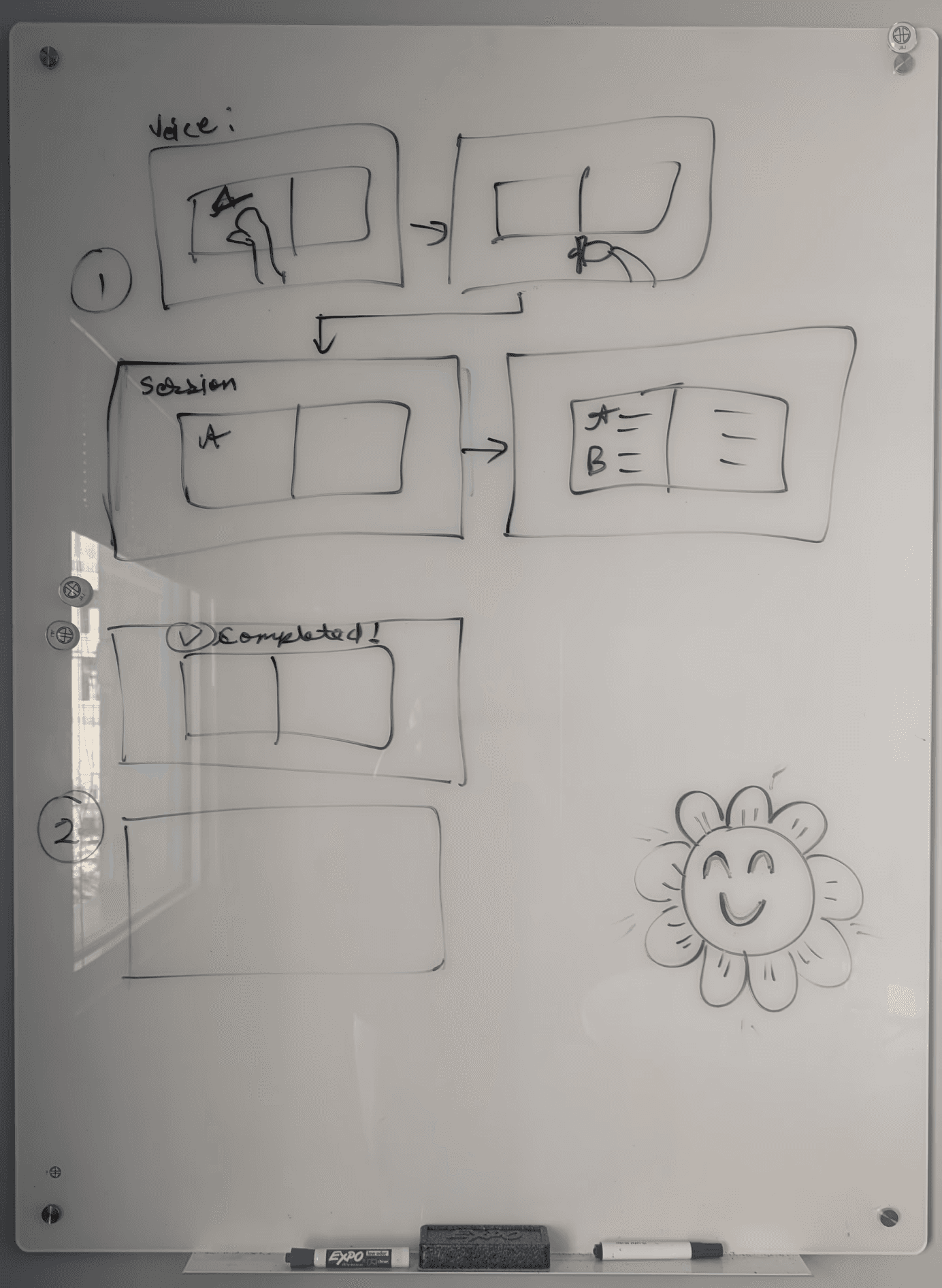
I used Figma Make to rapidly prototype the AR interface, starting with low-fidelity screen sketches and evolving into a functional interaction model. My focus throughout was on three principles:
Minimal Cognitive Load: Overlays appear only when contextually relevant
Emotional Safety: Feedback should feel like encouragement, not correction
Gradual Independence: Guidance fades as user performance improves
Stage 5: Storyboarding
I created illustrated storyboards for each persona, five to six frames each, depicting the real-world scenario from preparation through outcome. These storyboards were created using Gemini generative AI and grounded abstract design decisions in tangible human moments.
Key Design Decisions
Decision
Rationale
Ghost guides fade as performance improves
Prevents permanent dependency. Users internalize correct movements rather than always following a visual cue.
Local edge processing, not cloud
Ensures real-time latency for movement feedback. Keeps biometric data private by default.
Bone-conduction audio
Allows auditory guidance without cutting off environmental awareness, critical for safety in driving and athletic contexts.
Three distinct modes
One interface cannot serve a child with dyspraxia and a competitive athlete. Modes allow the same hardware to serve fundamentally different needs.
Color-coded force indicators
Force is invisible. Color provides an immediate, universally understood visual language for pressure feedback.
Challenges & Design Tensions
What Was Hard to Solve
Designing 6th surfaced several deep tensions between competing values. Working through these tensions produced the most interesting and defensible design decisions in the project.
Preventing Cognitive Overload
AR has a well-documented failure mode: too much information in the visual field degrades performance rather than enhancing it. I had to be ruthless about what appeared on screen and when. The solution was context-triggered overlays, guidance only activates during active tasks, and fades immediately once the movement is complete or corrected.
Balancing Assistance and Independence
The most uncomfortable design question: what if users never stop needing the system? Assistive technology should build capacity, not dependency. I addressed this by programming gradual assistance reduction, ghost guides fade as movement accuracy improves, and Assist Mode provides corrections only when deviation is detected. The goal is to teach, not to replace.
Designing Across Radically Different Contexts
The same physical hardware needs to serve a 9-year-old in a classroom, a 56-year-old recovering from a stroke, and a 19-year-old on an ice rink. These contexts differ in noise level, stakes, cognitive load, and emotional sensitivity. My three-mode system was the primary mechanism for handling this, alongside context-aware feedback thresholds.
Maintaining Dignity
Assistive technology carries a psychological weight. Designs that feel clinical or corrective can undermine the confidence they're meant to build. Every content decision in 6th was reviewed through this lens: does this feel like support, or does it feel like failure? Audio cues were written to be encouraging rather than alarming. Ghost guides were designed to lead, not to expose deficiency.
Key Design Decisions
Decision
Rationale
Ghost guides fade as performance improves
Prevents permanent dependency. Users internalize correct movements rather than always following a visual cue.
Local edge processing, not cloud
Ensures real-time latency for movement feedback. Keeps biometric data private by default.
Bone-conduction audio
Allows auditory guidance without cutting off environmental awareness, critical for safety in driving and athletic contexts.
Three distinct modes
One interface cannot serve a child with dyspraxia and a competitive athlete. Modes allow the same hardware to serve fundamentally different needs.
Color-coded force indicators
Force is invisible. Color provides an immediate, universally understood visual language for pressure feedback.
Safeguards & Ethics
Extra Perception Comes With Responsibility
Augmenting a human sense creates new obligations. 6th was designed with a safeguard framework addressing five distinct risk areas:
Risk Area
Safeguard
Privacy & Data
All biometric and motion data is processed locally on-device. Cloud sync is opt-in only for analytics. Users maintain full ownership of their data.
Dependency Prevention
Assistance levels automatically reduce as user performance improves. The system is designed to make itself less necessary over time.
Safety-Critical Contexts
In driving mode, the system provides guidance only, never control. Critical safety alerts override all non-essential overlays.
Cognitive Overload
Feedback is prioritized and limited. Only the most relevant signal is surfaced at any moment. Users can instantly disable the system with a gesture or button.
Emotional Safety
Feedback tone and language are carefully calibrated to feel supportive. Children's mode includes additional sensitivity settings and requires caregiver consent for data tracking.
Key Learnings
What This Project Taught Me
The Curb-Cut Effect
Designing specifically for proprioceptive impairment produced solutions that benefit a much wider population. Clearer movement feedback helps not only stroke survivors but aging adults, beginner athletes, and anyone learning a new physical skill. Accessibility, when designed intentionally, expands the value of a product rather than constraining it.
Intentional Empowerment
Movement awareness sits at the intersection of physical and mental wellness. A system that improves coordination also reduces anxiety, builds confidence, and restores a sense of agency. Products in this space must be designed not just for functional outcomes, but to actively build the user's belief in their own capacity.
Clarity Drives Independence
Complex biometric data is meaningless to most users. The design challenge is translation, turning invisible force measurements and alignment angles into immediately actionable, human-readable guidance. Clarity is not a feature; it's the precondition for everything else working.
Constraint Breeds Innovation
A weekend hackathon forced brutal prioritization. I had to identify the single most impactful interaction pattern for each user context and design it with care. The resulting prototype is more focused and usable than it would have been with unlimited time, a reminder that constraints are design inputs, not obstacles.
Accomplishments I’m Proud Of
Rapid Feasibility Scoping: Explored a novel speculative concept through iterative cycles calibrated for real-world realization.
Grounded Creativity: Imagined freely before applying UX principles to create a functional, testable system concept.
Industry-Level Thinking: Incorporated perspectives that pushed my solution beyond standard academic project boundaries.
Emotional Depth: Every design decision was evaluated against its impact on user dignity and confidence.
Future Directions
What's Next for 6th
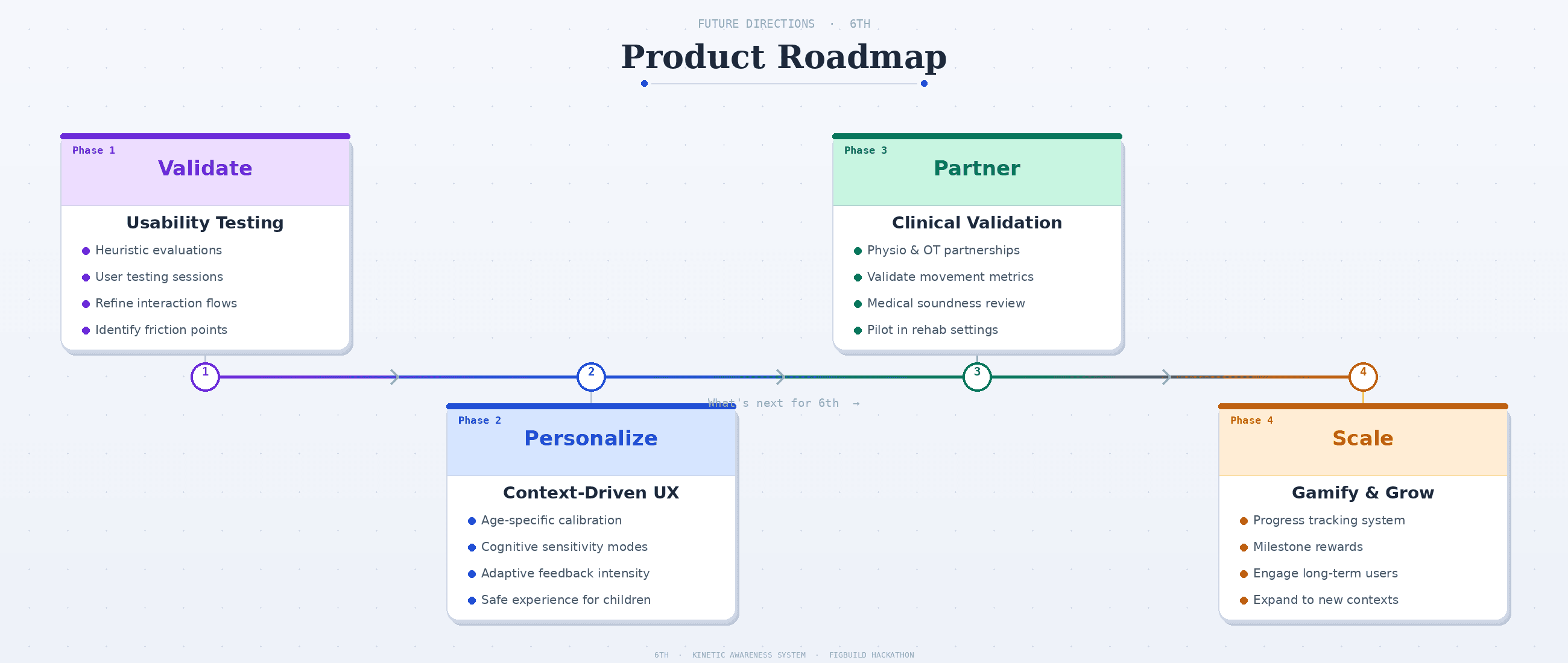
6th is a speculative design concept today, but the components it relies on, AR glasses, wearable IMUs, haptic feedback, edge AI, are all commercially available or rapidly approaching viability. The next steps for 6th focus on validation, refinement, and expansion:
Long-Term Vision
6th's long-term vision is to become a new interface layer between intention and motion, a standard component of how humans learn, recover, and move through the world. Movement should not be a mystery. 6th makes it visible. And visibility builds confidence.